Download Free Your Desired App
Home » Softwares » Operating Systems » Windows 7 All in One ISO Free Download
Windows 7 All in One ISO Free Download
Windows 7 All in One ISO Free Download 32 bit 64 bit Latest Version ISO Image. It is final Updated Bootable Disk Image of Windows 7 All in One ISO 32/64bit.
Windows 7 All in One ISO Overview
Windows 7 is an operating system developed by Microsoft which has got positive response from the users. Though all Windows versions are accepted by the users with great interest but Windows 7 is probably the top of the lot. After Windows XP, Windows 7 is the most widely used Windows version till date why because it is more reliable more user friendly and does not demand much from the user during installation. Windows 7 comes in many editions like Windows 7 Ultimate, Professional, Home Basic, Home Premium and Starter. What if you got all of these editions under one package. Windows 7 All in One ISO is the package which will give you all the editions in one ISO file. All you need to do is to select the edition of your choice and install it into your system. You can also Download Windows 7 Ultimate if you need it separate.  The installation process of these editions is very simple and the drivers for WLAN and other manufacturers are already added in it.Once you will install it into your system you will explore the stunning features that Windows 7 has to offer like Windows Essentials. In Windows Essentials you have lots of free programs like Photo Gallery for organizing and editing your photos. Windows Live Writer is also included by which you can create breathtaking blogs within minutes and can add the multimedia content with ease. Some speculated wallpapers have been included in these editions which will make you desktop lively and attractive. The task bar has been redesigned so that you can work smarter. Plus the gadgets have all been on improving end. You can also Download Windows 7 Professional separately if you only need this.
  On a conclusive note we can say that Windows 7 All in One ISO is one comprehensive package for all Windows 7 lovers which will give you the option to select the edition of your choice to install in your system.
Features of Windows 7 All in One ISO
Below are some noticeable features which you’ll experience after Windows 7 All in One ISO free download.
- Comprehensive package which contains all Windows 7 editions.
- It includes following:-
- Starter (x86 only)
- Home Basic (x64/x86)
- Home Premium (x64/x86)
- Professional (x64/x86)
- Ultimate (x64/x86)
- Easy to install.
- Drivers for WLAN and other manufacturers already added.
- Redesigned task bar.
- Windows Live Writer included for writing instant blogs.

Windows 7 All in One ISO Technical Setup Details
- Software Full Name: Microsoft Windows 7 AIO-SP1 (x64 & x86) [All in One]
- Setup File Name: Windows_7_AIO_SP1_x64_x86.ISO
- Full Setup Size: 3.81 GB
- Setup Type: Offline Installer / Full Standalone Setup
- Compatibility Architecture: 32 Bit (x86) / 64 Bit (x64)
- Latest Version Release Added On: 4th Jan 2014
- Developers: Microsoft
System Requirements For Windows 7 All in One ISO
Before you start Windows 7 All in One ISO free download, make sure your PC meets minimum system requirements.
- Memory (RAM): 1GB of RAM required.
- Hard Disk Space: 16GB of free space required.
- Processor: 1GHz processor or faster.
Windows 7 All in One ISO Free Download
Click on below button to start Windows 7 All in One ISO Free Download. This is complete offline installer and standalone setup for Windows 7 All in One ISO. This would be compatible with both 32 bit and 64 bit windows.
Before Installing Software You Must Watch This Installation Guide Video

Related posts:
This Post was Last Updated On: September 14, 2023
-
-
-
-
All drivers of all laptops are uploaded in driverpack 2014
http://getintopc.com/softwares/utilities/driverpack-solution-14-free-download/ -
-
-
-
-
-
-
-
-
-
-
-
-
#19 written by Mr Jake 11 years ago
-
-
-
-
-
-
-
-
-
-
-
-
-
-
-
-
-
-
-
-
-
-
#42 written by Akash Rajveer Gonesh Chaube 11 years ago
-
-
-
-
-
-
-
First of all sorry for late reply. Secondly Your English is perfect. Don’t say sorry about this.
Thirdly, I would look for AIO iso with updates. If I can find I’ll post it soon. But I have a suggestion. After installation when It ask to enable updates. Select “Ask me later”. Then after windows installation is finish. Go into control panel and manually install chunk of updates. Install security updates first.
-
-
-
-
#56 written by Κωνσταντίνος Τσανάκας 11 years ago
-
-
-
There are couple of tools posted. Rufus is a good option.
http://getintopc.com/softwares/utilities/rufus-free-download/ -
-
-
-
-
-
-
#69 written by Paul Humphries 11 years ago
Hi Fatima, I have burned the ISO. File to disk (which was very easy by the way. 🙂 Thx.) B4 i run and install it, will the automatic updates work.! , when installed.? ,and will it work permanent.? As i noticed it says :- licence: FreeTrial.? In the description above.! Would be gr8fully for any help or advice with this.? Thanx. 🙂
-
-
-
#72 written by Muhammad Umar 11 years ago
-
-
-
-
-
-
-
-
-
-
here you have a tutorial https://www.youtube.com/watch?v=S8kj_h8d5yU
-
-
-
#86 written by Travis Kolden 11 years ago
So I’ve been watching this site for about a half of a year. I like to do a fresh install , I downloaded this yesterday and my experiences with AIO isos were not good. However, this one installed perfect! Like another poster said, there are a lot of updates. I’m adding this to my Yumi drive since I do a lot of freelance computer work. It would be nice to have a MD5 or a SHA-1 however. But I haven’t had a problem yet! I recommend this site to all people. Whether you want to try out an operating system before you buy or you have a genuine license but you need the ISO or just good to have a backup. I use the program Yumi (multiboot USB creator) I won’t give the link, Just Google pendrivelinux and the first link and you should find Yumi. Meaning you can have multiple isos on a USB. Linux, Windows, System Recovery, Anti-virus iso. Just a thought to people who want multiple ISOs on a USB. It’s also very good to just use for one ISO.
-
-
-
As Fatima said, go check for missing drivers here http://support.hp.com/us-en/product/HP-ENVY-6-Ultrabook/5296040/model/5321824/drivers
-
here is you answer http://www.intel.com/content/www/us/en/windows/windows-8-vs-windows-7.html
-
-
-
-
-
-
-
-
all your questions about GPT and MBR answered here, take a look https://msdn.microsoft.com/en-us/library/windows/hardware/dn640535(v=vs.85).aspx
-
-
-
check here and make sure you are doing right https://www.bing.com/videos/search?q=install+windows+7+virtualbox&qs=AS&sk=AS1&FORM=QBVR&pq=install%20windows%207%20virt&sc=8-22&sp=2&qs=AS&sk=AS1
-
#102 written by Israel Rivera 11 years ago
-
-
-
-
-
-
-
-
-
-
#113 written by Andrew Geo 11 years ago
You May Download A Language Pack After Installation
Ultimate and Enterprise Support Every Language Pack But Urdu (According to http://windows.microsoft.com/el-gr/windows/language-packs#lptabs=win7) Can Be Installed On Every Version.
If You Cannot Install It, Use Vistalizator -
-
-
-
-
-
#122 written by AddictDownloaderXD 11 years ago
-
-
-
#126 written by Dhananjay Meena 11 years ago
-
-
-
-
-
#132 written by Rishabh Gupta 11 years ago
-
-
-
-
I’m sorry I just noticed screenshot. Enterprise is not included.
Here you go
http://getintopc.com/softwares/operating-systems/windows-7-enterprise-free-download-iso-32-bit-64-bit/ -
-
-
#145 written by Adi 11 years ago
Hello Fatima Afridi,
Can you Please! Answer a few question about this Windows 7 AIO iso discussed in this post.
First is that is it contains all the latest updates from Microsoft and of which date Please!
Second is it also contains all the Windows 7 Editions (32 + 64 bit) as you stated above in this post above Please!
*(These are for my personal questions not for Making any other blog or posting it to another website)-
no, Enterprise is not included but you can get it from here http://getintopc.com/softwares/operating-systems/windows-7-enterprise-free-download-iso-32-bit-64-bit/ and yes both versions are included 32 bit and 64 bit, about the updates i don’t know, but always can use Windows update
-
-
-
-
#149 written by hankm64 11 years ago
-
-
-
-
here is your guide http://getintopc.com/tutorials/windows-7-usb-installation/
-
#154 written by Masoud K 11 years ago
-
-
-
#157 written by NinjasKill123 11 years ago
-
-
-
#160 written by garrett gaddy 11 years ago
you want YUMI for USB’s not only can it convert an iso to flash drive, but it lets you add multiple ISO’s of different types, I’ve got Ubuntu, Kali, Win10, and WinXp, after this i’ll also have win 7!
this is the link:
http://getintopc.com/softwares/utilities/yumi-multiboot-usb-creator-free-download/
try it out, I use it all the time. -
-
No No. Simply pasting iso into thumb drive wont do the magic. Use Proper tools like Rufus.
http://getintopc.com/tutorials/windows-7-usb-installation/ -
-
-
-
-
-
-
-
-
-
-
-
-
#180 written by Alexis Gonzalez 10 years ago
I would like to know if the Windows 7 All in One ISO is from a specific computer brand such as Dell or can it be install in any computer.I put together a PC with an ASUS motherboard and I’ve been running Windows 7 Professional, but after 4 years I’m getting a “Non Genuine Software” message. I do not have the original Disk so, maybe I can re-install the OS with this version you offer and reenter the license and ID. Would this work?
-
-
-
#187 written by ssajiddali 10 years ago
Hi
i am trying to download but after prcessing it take me to the site
http://filehoslguru.com/DedicatedRequest.php
please check the link,let me know
thanks
sajid
-
-
-
-
-
-
-
#199 written by Md Shahnawaz Hussain 10 years ago
-
-
-
-
-
#212 written by Prince Asim Khan 8 years ago
-
#215 written by Bigsh Hit 6 years ago
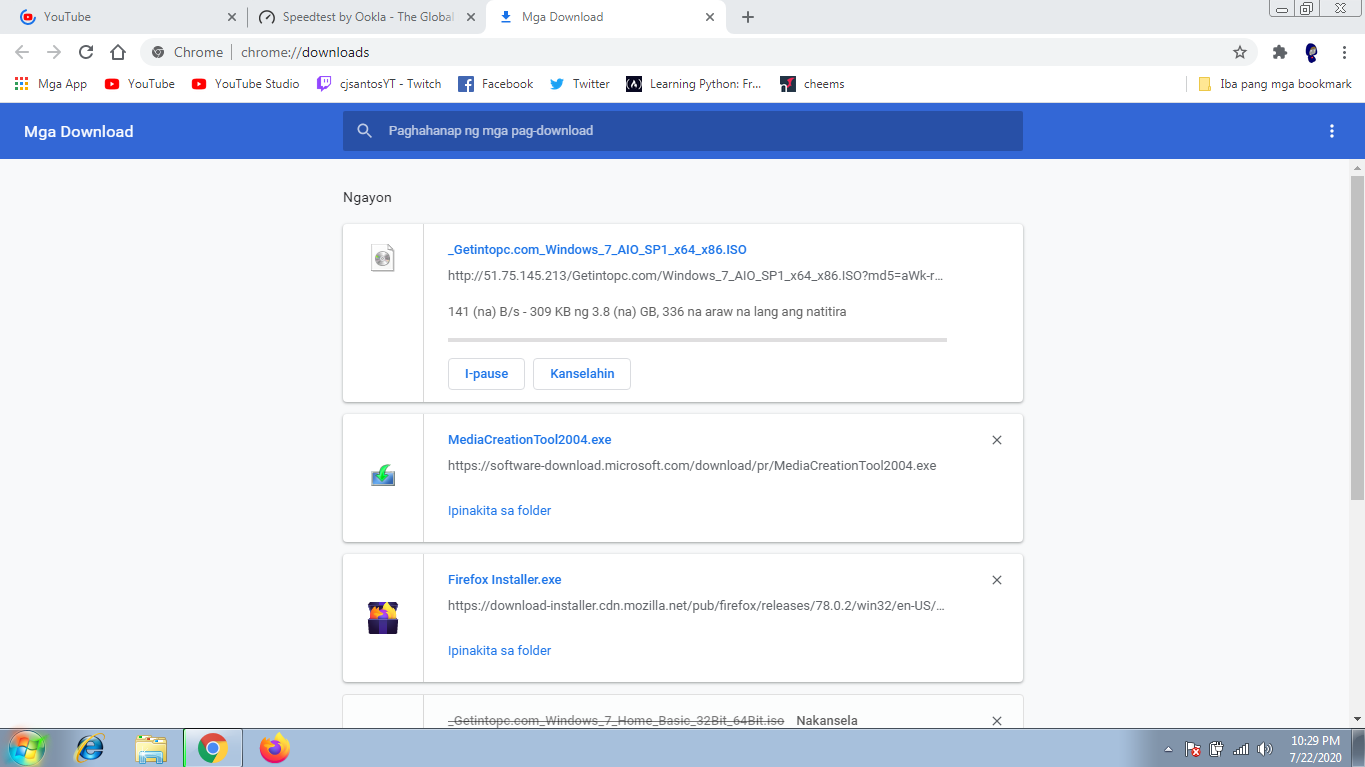
why does my download take 366 days, i have 25 mbs download speed and yet this happens, is there another link that doesnt take 366 days to download https://uploads.disquscdn.com/images/58e1b3b274f9d49612b535064fb68b33c7df5927e1012ec3010947cb2c3c2730.png
-
-
#220 written by GUNS4HIRE 5 years ago
-
- Comment Feed for this Post


You Are The BEST !