Home » Softwares » Operating Systems » Kali Linux 2020 Free Download
Kali Linux 2020 Free Download
Kali Linux 2020 Free Download Latest Version for Windows. It is full offline installer standalone setup of Kali Linux 2020 Free Download.
Kali Linux 2020 Overview
Kali Linux 2020 is an advanced Linux distribution widely used for various purposes such as for testing, developing, ethical hacking, network security check, and more. The operating system is expertise in security, forensic workspace and penetrating testing systems. Its an open-source and free to use operating system with over 600 testing programs which include Nmap, Wireshark, Burp suite, OWASP, and more. You can also download Windows 7 All in One 28in1 Updated Jan 2020.

Kali Linux 2020 can be installed and run in a native hard drive or can be booted from a live CD, or USB device or through a virtual machine such as Virtual Box or Oracle VM. Back then the operating system was known as Backtrack mainly for hacking purpose but now users can process a wide range of tasks as per their desire. The interface of the operating system is simple, classic and straightforward allowing easy switching and navigating through applications. Users can deploy multiple tools for simultaneously performing different tasks with easy switching and access. You can also download Windows 7 / 8.1 / 10 Ultimate Pro Updated Jan 2020.

Features of Kali Linux 2020
Below are some noticeable features which you’ll experience after Kali Linux 2020 free download.
- Secured and open-source OS.
- Simple and easy to use.
- Powerful and advanced terminal.
- Test, develop, secure, and more.
- Included with 600 testing programs.
- Simple, classic and straightforward user interface.
- Deploy multiple tools at once for multi-tasking.
- Operate from Hard drive, CD, USB, or Virtual machine.

Kali Linux 2020 Technical Setup Details
- Software Full Name: Kali Linux 2020
- Setup File Name: kali-linux-2020.1a-installer-i386.iso, kali-linux-2020.1a-installer-amd64.iso
- Full Setup Size: 1.7 GB. 2 GB
- Setup Type: Offline Installer / Full Standalone Setup
- Compatibility Architecture: 32 Bit (x86) / 64 Bit (x64)
- Latest Version Release Added On: 02nd Mar 2020
- Developers: Homepage

System Requirements For Kali Linux 2020
Before you start Kali Linux 2020 free download, make sure your PC meets minimum system requirements.
- Operating System: Windows XP/Vista/7/8/8.1/10.
- Memory (RAM): 1 GB of RAM required.
- Hard Disk Space: 3 GB of free space required.
- Processor: Intel Dual Core processor or later.
Kali Linux 2020 Free Download
Click on below button to start Kali Linux 2020 Free Download. This is complete offline installer and standalone setup for Kali Linux 2020. This would be compatible with 64 bit windows.
Password 123
Related posts:
This Post was Last Updated On: September 14, 2023
- #12 written by SUDIPTA PRADHAN 6 years ago
- #17 written by Kirito 6 years ago
Guys is it possible that I can install 2 OS at the same time? Can you email me? here’s my email, [email protected]
- #19 written by Atul Sahu 6 years ago
- #22 written by Sudip Paul 6 years ago
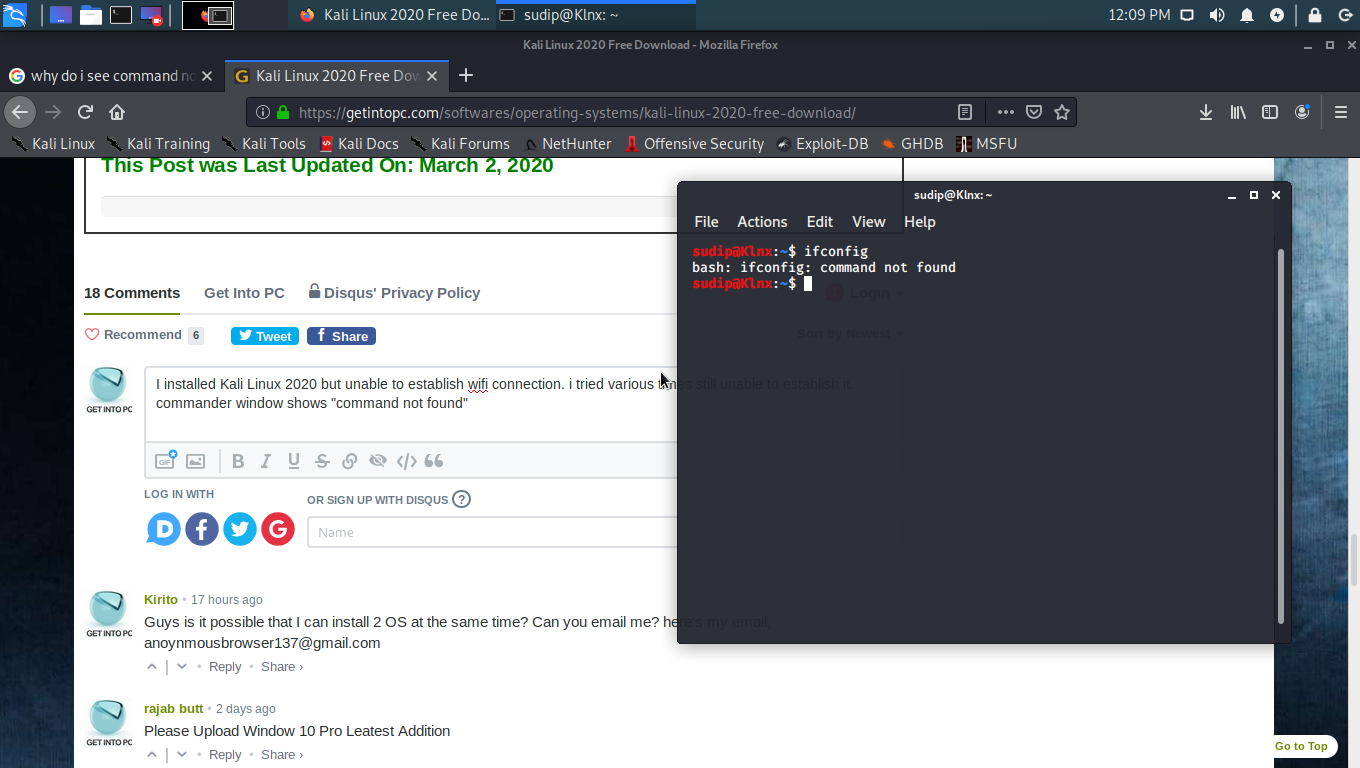
I installed Kali Linux 2020 but unable to establish wifi connection. i tried various times still unable to establish it.
commander window shows “command not found”
what shall i do? https://uploads.disquscdn.com/images/9eabddafde6db47361cc63e47384853a559683ff2d8d07abcc1cc65d93ddb9ca.png- #24 written by Raki Pandaga 6 years ago
- #27 written by Anonymou513 6 years ago
- #29 written by Aksshat Sharrma 6 years ago
- #32 written by unknown 6 years ago
- #33 written by m1ck3Y 6 years ago
- #34 written by Raki Pandaga 6 years ago
turn on
the pc and when grub is loaded then press E then u will see some text
lines,then find a line starting with linux there at the end of line
after random UUID code enterinitrd=/install/initrd.gz init=/bin/bash
then press F10
then
u will see root terminal there type “passwd” hit enter then enter
password hit enter then again type password hit enter,now type “exec
/sbin/init” hit enter.your root password has been changed succesfully.check it in terminal type su then type root password.
if u need help you can contact me to my whatsapp number +917032159301 i will help you out
- #36 written by Raki Pandaga 6 years ago
u can change the root password using following steps:
turn on the pc and when grub is loaded then press E then u will see some text lines,then find a line starting with linux there at the end of line after random UUID code enterinitrd=/install/initrd.gz init=/bin/bash
then press F10
then u will see root terminal there type “passwd” hit enter then enter password hit enter then again type password hit enter,now type “exec /sbin/init” hit enter.your root password has been changed succesfully.
check it in terminal type su then type root password.
if u need help you can contact me to my whatsapp number +917032159301 i will help you out
- #37 written by Raki Pandaga 6 years ago
u can change the root password using following steps:
turn on
the pc and when grub is loaded then press E then u will see some text
lines,then find a line starting with linux there at the end of line
after random UUID code enter
initrd=/install/initrd.gz init=/bin/bash
then press F10
then
u will see root terminal there type “passwd” hit enter then enter
password hit enter then again type password hit enter,now type “exec
/sbin/init” hit enter.your root password has been changed succesfully.
check it in terminal type su then type root password
- #38 written by yasser darwish 6 years ago
- #40 written by Arshad Ahmed 6 years ago
- #45 written by Jåïñdû Çhàriñdith 6 years ago
- #53 written by Ravi Teja 6 years ago
- #57 written by nkab 5 years ago
- #58 written by Megha Amarasinghe 4 years ago
https://www.youtube.com/watch?v=BRk71KypnBg&t=517s watch this video and get a better idea about the installation
- #59 written by Sandeep Iter 5 years ago
- #61 written by Sandeep Iter 5 years ago
- #64 written by Cartiq Rao 4 years ago
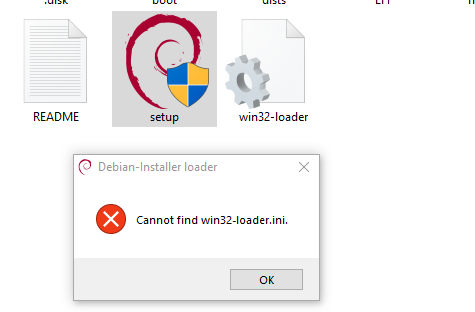
Why ,I’m having this error ? https://uploads.disquscdn.com/images/ee4684efe93050b71fd622d8a932e47ded41a9a0286c2169d686aa9911e3c5c3.png
- #68 written by Muhammad Ąbďuĺlàh Islam 4 years ago
- #70 written by Allastair sparks 4 years ago
- Comment Feed for this Post


Good First One Here