Download Free Your Desired App
Home » Softwares » Operating Systems » Windows 7 All in One 28in1 Updated Jan 2020 Download
Windows 7 All in One 28in1 Updated Jan 2020 Download
Windows 7 All in One 28in1 Updated Jan 2020 Download Latest OEM RTM version. It is Full Bootable ISO Image of Windows 7 All in One 28in1.
Windows 7 All in One 28in1 Updated Jan 2020 Overview
Windows OS is an operating system which was first introduced in mid 80s and since then it has become the most famous Windows OS all around the globe. It has taken the world by storm due to it’s simplicity and easy of use. This operating system has emphasized greatly on security and stability aspects. Windows come up in many version but the most popular ones of them were Windows XP and Windows 7. You can also download Windows 7 x86 x64 AIO 22in1 Updated Nov 2019.

Windows 7 All in One 28in1 Updated Jan 2020 has been equipped with .NET Framework 4.8. User’s browsing experience has been enhanced greatly with the introduction of Internet Explorer 11. It has also been equipped with Diagonotics and Recovery Toolset 10. The multimedia experience has been improved greatly with the introduction of Windows Media Player 11. You can also download Windows 7 AIO 32 / 64 Bit Feb 2019.
[ RELEASE INFO ]
- File: WIN7DUAL.en-US.JAN2020.iso
- Size: 6,16GB
- Format: Bootable ISO
- SOURCES:
- 32bit: dvd-677460 & 677710
- 64bit: dvd-677332 & 677651
- CRC32: ee9243a3
- MD5 : 74e0c7afe7e4737b68f6975872296a05
- SHA-1: 83b09992b266afd0bf42b5e0228e091d947a6a92
[ CONTENTS ]
Integrated / Pre-installed:
- Internet Explorer 11
- .NET Framework 4.8
- DirectX End-User Runtimes (June 2010)
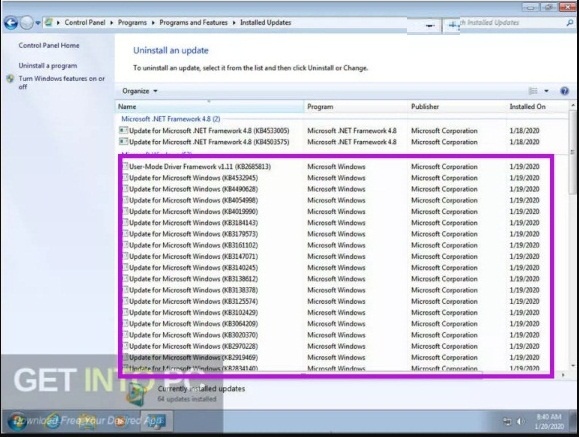
- Important & Security Only Updates – 2020-01-14
SetupComplete / Post-install:
- Windows Defender Updates
- LANGUAGE: ENGLISH US
[ EDITIONS INCLUDED ]
32bit:
- Windows 7 Home Basic – – – -STD / DAZ / OEM
- Windows 7 Home Premium -STD / DAZ / OEM
- Windows 7 Professional – – – STD / DAZ / OEM
- Windows 7 Enterprise – – – – -STD / KMS
- Windows 7 Ultimate – – – – – – STD / DAZ / OEM
64bit:
- Windows 7 Home Basic – – – -STD / DAZ / OEM
- Windows 7 Home Premium -STD / DAZ / OEM
- Windows 7 Professional – – – STD / DAZ / OEM
- Windows 7 Enterprise – – – – -STD / KMS
- Windows 7 Ultimate – – – – – – STD / DAZ / OEM
- STD = Standard installation – For those with own License Key
- DAZ = Activated by DAZ Loader v2.2.2.0
- KMS = Activated by KMS_VL_ALL
- OEM (Original Equipment Manufacturer) will automatically activate original version installed by Manufacturer.
Screenshots:


Features of Windows 7 All in One 28in1 Updated Jan 2020
Below are some noticeable features which you’ll experience after Windows 7 All in One 28in1 Updated Jan 2020 free download.
- Equipped with .NET Framework 4.8.
- Equipped with Internet Explorer 11 with enhanced web browsing.
- Equipped with Diagnostics and Recovery Toolset 10.
- Got Windows Media Player 11 that has enhanced the media experience.
Windows 7 All in One 28in1 Updated Jan 2020 Technical Setup Details
- Software Full Name: Windows 7 All in One 28in1 Updated Jan 2020
- Setup File Name: WIN7DUAL.en-US.JAN2020.iso
- Full Setup Size: 6.2 GB
- Setup Type: Offline Installer / Full Standalone Setup
- Compatibility Architecture: 32 Bit (x86) / 64 Bit (x64)
- Latest Version Release Added On: 07th Feb 2020
- Developers: Windows
System Requirements For Windows 7 All in One 28in1 Updated Jan 2020
Before you start Windows 7 All in One 28in1 Updated Jan 2020 free download, make sure your PC meets minimum system requirements.
- Memory (RAM): 1 GB of RAM required.
- Hard Disk Space: 16 GB of free space required.
- Processor: 1 GHz Intel Pentium processor or later.
Windows 7 All in One 28in1 Updated Jan 2020 Free Download
Click on below button to start Windows 7 All in One 28in1 Updated Jan 2020 Free Download. This is complete offline installer and standalone setup for Windows 7 All in One 28in1 Updated Jan 2020. This would be compatible with both 32 bit and 64 bit windows.
Related posts:
This Post was Last Updated On: September 14, 2023
-
#3 written by Dodz Dagondon 6 years ago
-
#7 written by Hasrat Ansari 6 years ago
-
-
-
#13 written by adhie sigli 6 years ago
-
#15 written by Rehan Khan 6 years ago
-
Download Pro from below link. This is official untouched Pro version. After installation you can install updates from control Panel. You can also activate by downloading toolkit.
https://getintopc.com/softwares/operating-systems/windows-7-professional-free-download-iso-32-64-bit-1030251/ -
-
#18 written by Rehan Khan 6 years ago
-
-
Download Pro from below link. This is official untouched Pro version. After installation you can install updates from control Panel. You can also activate by downloading toolkit.
https://getintopc.com/softwares/operating-systems/windows-7-professional-free-download-iso-32-64-bit-1030251/-
#21 written by Shruti Patel 6 years ago
-
-
-
-
#25 written by Harman Sandhu 6 years ago
-
-
#30 written by mazz ahmad 6 years ago
-
-
-
-
#37 written by Banjo 6 years ago
-
#39 written by Vipin Pandey 6 years ago
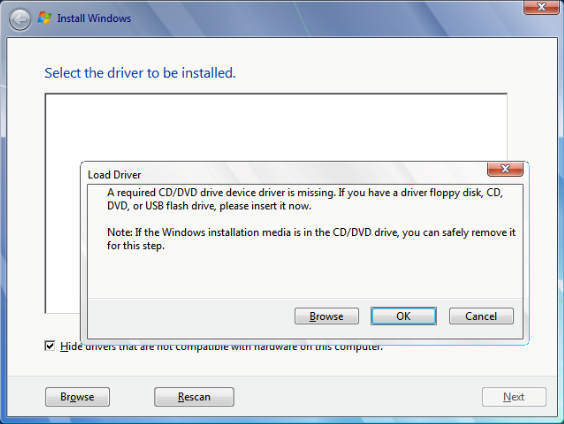
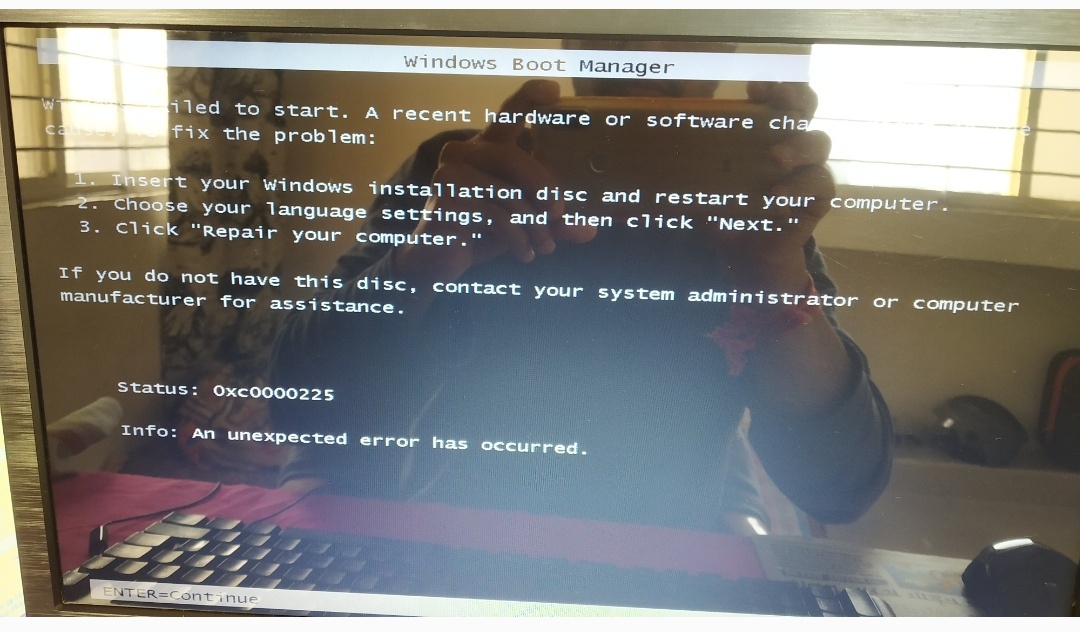
I am getting this error during installation, pls help… https://uploads.disquscdn.com/images/71649810bdfbf2614760aa8e5ee381be31ec2f8335518ff3faf5abcb0cc27cad.jpg
-
-
#47 written by Ricardo Perez 6 years ago
-
-
#57 written by Don 6 years ago
-
#58 written by ***Knight Rider*** 6 years ago
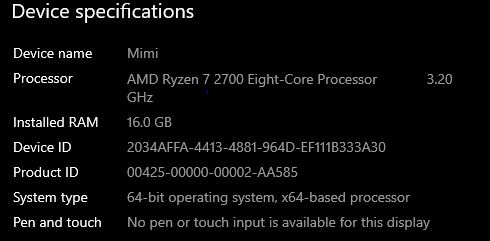
Its a new PC right ..Proibably 1 year old max..Its the Drivers..Do you reall wanna get Win 7 Working..Get this Tool https://forums.mydigitallife.net/threads/windows-7-image-updater-skylake-kabylake-coffelake-ryzen-threadripper.76335/ Two options..Start from Scratch and get an ISO ready so that u can reuse..
Else use the drivers from Windows 7/ Drivers under the main folder.U know how to get them on the computer..In repairing mode use the DISM tool..or in some computers keyboard works for a while
-
-
#61 written by ***Knight Rider*** 6 years ago
-
#62 written by ***Knight Rider*** 6 years ago
Can u answer me admin..Can u Please create a Win7 Ult x64 single edition ISO including the drivers which came with ATAK’s tool..See, this is gonna help a lot of people as it will enable Win 7 to work on newest of computers and if the install is dont thru win 10 environment..Pls make it as u used to before….Including only the important of updates..Its gonna rock.
-
-
#63 written by Kumar 6 years ago
-
#65 written by leo patrick vallejo 6 years ago
-
#67 written by Muhammad Waseem Sajjad 6 years ago
-
-
#71 written by Muhammad Waseem Sajjad 6 years ago
-
-
#74 written by Vijay Prasad 6 years ago
-
-
-
#82 written by Octane 6 years ago
-
#84 written by adhie sigli 6 years ago
-
#85 written by ***Knight Rider*** 6 years ago
***Knight Rider*** Don • 2 days ago
Its a new PC right ..Proibably 1 year old max..Its the Drivers..Do you reall wanna get Win 7 Working..Get this Tool https://forums.mydigitallif…
Two options..Start from Scratch and get an ISO ready so that u can reuse..
Else
use the drivers from Windows 7/ Drivers under the main folder.U know
how to get them on the computer..In repairing mode use the DISM tool..or
in some computers keyboard works for a while..
If u are not comfortable u shud get somebody’s help..Its kindaa hectic..They are making it so.
-
-
#89 written by Vipin Pandey 6 years ago
-
-
#96 written by Rohith Reddy 6 years ago
-
#97 written by Matthew 6 years ago
This happens to me awhile ago and it really sucked. There are 2 things you can do to get out of this situation but both require another computer.
1. If you have access to another computer you can see if there are any drivers compatible with your PC with Windows 7 and put it on a disc which is a hassle and tedious but most definitely possible.
2. Go back to whatever version of Windows you used previously. If you used Windows 10 you can download a copy from Microsoft for free with the Media Tool. You’d have to set it up on another PC and put whatever copy of Windows 10 on a USB or Disc. After you do all that put either the USB or Disc into the PC and boot to that before Windows 7 starts up. It’ll take you through the Windows 10 setup process and you will have all your drivers and Windows should be activated as long as you choose the copy of Windows 10 that was on the PC originally.
-
-
-
#104 written by Sa Jad 6 years ago
-
#107 written by Shivam Nolkha 6 years ago
-
#108 written by Matthew 6 years ago
This happens to me awhile ago and it really sucked. There are 2 things you can do to get out of this situation but both require another computer.
1. If you have access to another computer you can see if there are any drivers compatible with your PC with Windows 7 and put it on a disc which is a hassle and tedious but most definitely possible.
2. Go back to whatever version of Windows you used previously. If you used Windows 10 you can download a copy from Microsoft for free with the Media Tool. You’d have to set it up on another PC and put whatever copy of Windows 10 on a USB or Disc. After you do all that put either the USB or Disc into the PC and boot to that before Windows 7 starts up. It’ll take you through the Windows 10 setup process and you will have all your drivers and Windows should be activated as long as you choose the copy of Windows 10 that was on the PC originally
-
-
#112 written by Ehsan Faridi 6 years ago
-
#117 written by Jassi 7 months ago
-
#119 written by z4f4n 6 months ago
-
#120 written by ali 5 months ago
-
#125 written by Don 6 years ago
-
Your pc is compatible with windows 7 but from January Microsoft stopped supporting windows 7 why don’t you try latest windows 10 may be your pc is great for windows 10 so try upgrade to windows 10 latest version posted on our site 🙂
And am not admin am just helping people who are stuck inbetween the software with issue as a community member gtp is my favourite site 🙂 -
- Comment Feed for this Post


Thanks for this