Download Free Your Desired App
Home » Softwares » Operating Systems » Windows 11 Free Download
Windows 11 Free Download
Windows 11 Free Download Latest OEM RTM version. It is Full Bootable ISO Image of Windows 11 Free Download.
Windows 11 Overview
Windows 11 is the latest version of the famous Windows operating system. Windows 11 has gone through many changes compared to Windows 10. These changes include enhancements in design and performance. This Windows was previously known as Windows 10X which was developed for the dual screen devices. After this project’s demolition it was reported that some new features of Windows 10x had been added to Windows 10 under an update Sun Vally. After some time Microsoft officially announced Windows 11. You can also download Windows 11 With Office 2019 Pro Plus.

Windows 11 is the modernized version of Windows 10 and many of its parts are in accordance with modern design. It relies on the design language of Microsoft Fluent Design like Start menu removes live tiles feature and it has been replaced it with the icons. It has provided the cleanest versions available on the Internet without any additional manipulation. There is no need for the TPM or Secure Boot module in some of the versions. It has got a redesigned taskbar, search interface and start menu. It has also added widgets section to the taskbar and it also displays the weather, news as well as other content. You can also download Windows 10 Enterprise Sept 2021. This ISO include following versions.
- Windows 11 Home
- Windows 11 Pro
- Windows 11 Home Single Language
- Windows 11 Pro Education
- Windows 11 Pro for Workstations
- Windows 11 Education
- Windows 11 Enterprise
- Windows 11 IoT Enterprise
- Windows 11 Home N
- Windows 11 Pro N
- Windows 11 Pro Education N
- Windows 11 Pro N for Workstations
- Windows 11 Education N
- Windows 11 Enterprise N

Features of Windows 11
Below are some noticeable features which you’ll experience after Windows 11 free download.
- Windows 11 is the modernized version of Windows 10.
- Relies on the design language of Microsoft Fluent Design like Start menu removes live tiles feature and it has relaced it with the icons.
- Provided the cleanest versions available on the Internet without any additional manipulation.
- No need for the TPM or Secure Boot module in some of the versions.
- Got a redesigned taskbar, search interface and start menu.
- It has added widgets section to the taskbar and it also displays the weather, news as well as other content.

Windows 11 Technical Setup Details
- Software Full Name: Windows 11
- Setup File Name: Win.11.AIO.14in1.22000.194.x64_MULTI9.iso
- Full Setup Size: 4.9 GB
- Setup Type: Offline Installer / Full Standalone Setup:
- Compatibility Architecture: 64 Bit (x64)
- Latest Version Release Added On: 09th Oct 2021
- Developers: Windows

System Requirements For Windows 11
Before you start Windows 11 free download, make sure your PC meets minimum system requirements.
- Memory (RAM): 4GB of RAM required.
- Hard Disk Space: 64 GB of free space required.
- TPM: Trusted Platform Module 2.0 (common on motherboards manufactured after 2016) (Not needed in Unlocked versions)
- Graphics Card: Compatible with DirectX 12 or later with WDDM 2.0 driver.
- Display: An HD display at least 720p (1280×720) resolution larger than 9″ diagonal, 8-bits per color channel.
- System Firmware: UEFI and Secure Boot capable (Secure Boot is not needed in Unlocked versions)
- Processor: 1GHz or faster with 2 or more cores on a compatible 64-bit processor.
Windows 11 Free Download
Click on below button to start Windows 11 Free Download. This is complete offline installer and standalone setup for Windows 11. This would be compatible with 64 bit windows.
Related posts:
This Post was Last Updated On: October 4, 2023
-
#2 written by Wraith Storm 5 years ago
-
-
#6 written by محمد ریحان 5 years ago
-
-
#11 written by ahmad khrousheh 5 years ago
-
#12 written by Mr Mahipal Singh 5 years ago
-
#15 written by Gilang 5 years ago
-
-
-
-
-
#25 written by mubark bkri 5 years ago
-
-
#31 written by Lungelo Ngobese 5 years ago
-
-
#33 written by Lungelo Ngobese 5 years ago
-
-
-
#35 written by Quanavo 5 years ago
-
#37 written by vignesh 5 years ago
-
-
#43 written by Prince Fred Chukwuma Omenaeche 5 years ago
-
#45 written by Uhauraik 5 years ago
-
#46 written by Akshit Gupta 5 years ago
-
-
#49 written by Ekansh Sharma 5 years ago
-
-
#54 written by Ibrahim Muhammad 5 years ago
-
#55 written by Aman 5 years ago
-
#56 written by Hightech 5 years ago
are you like the supreme deity telling people not to comment? this is a site for cracked/hacked programs and information is also allowed ! Ibrahim NO, it will not allow drag and drop to taskbar as bayit stated it will allow you to pin programs to start menu and from start you can pin anything you want to taskbar. Aman, maybe you should ask the staff here to make you their police? your ego -with respect i type this- makes me throw up.
-
-
-
-
#61 written by SminAnSJaSDffABruh 5 years ago
-
it does not have office with this
there is seperate version for win11 with offlice
https://getintopc.com/softwares/operating-systems/windows-11-with-office-2019-pro-plus-free-download-8376133/
this one has both versionWindows 11 Home
Windows 11 Pro
Windows 11 Home Single Language
Windows 11 Pro Education
Windows 11 Pro for Workstations
Windows 11 Education
Windows 11 Enterprise
Windows 11 IoT Enterprise
Windows 11 Home N
Windows 11 Pro N
Windows 11 Pro Education N
Windows 11 Pro N for Workstations
Windows 11 Education N
Windows 11 Enterprise N-
#63 written by SminAnSJaSDffABruh 5 years ago
-
#65 written by bayit 5 years ago
I advise if you already have an activated windows 10 installation to just do an update from USB Key by navigating to where “setup.exe” is located on the USB Key. it will update. I also advise not connecting to internet during the update. the first bootup will give you an error saying that your copy is not genuine yet as soon as you connect to the internet it will activate. get my drift, Mister and misses experts?
-
-
-
#67 written by Mister Tadatoki 5 years ago
-
#68 written by Aman 5 years ago
do clean installation from this iso but if you want to upgrade download iso from official website and use bypass method and it is after extracting all files from iso in a folder go to sources folder and delete appraiserres.dll file and after that go back once and the setup in case you want to upgrade
-
-
-
-
-
#76 written by Mad “Maddox” Ox 5 years ago
-
-
#80 written by Hightech 5 years ago
make USB Key with rufus Run setup.exe from USB , this will update your existing windows 10. It’s not locked nor does it require TPM 2.0 . Yes and you will receive all Cumulative updates. don’t listen to this rabbit Aman jumping around like a rabbit thinking he knows what to do. and I’ll add it will say that your copy is not genuine at first boot just connect to internet and it will auto activate as it updated your windows 10. remember? ahahahahahah all is well. FOLKS You do not have to do bypass method when updating your existing windows 10 OS To windows 11.
-
#81 written by Glenn Sevilla 4 years ago
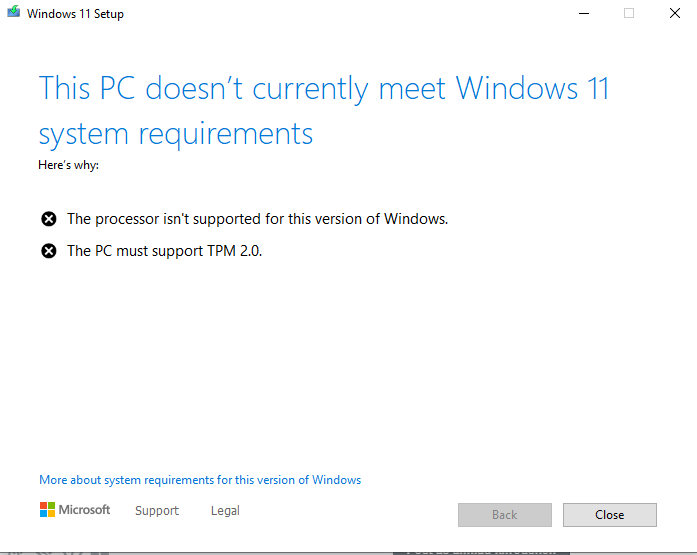
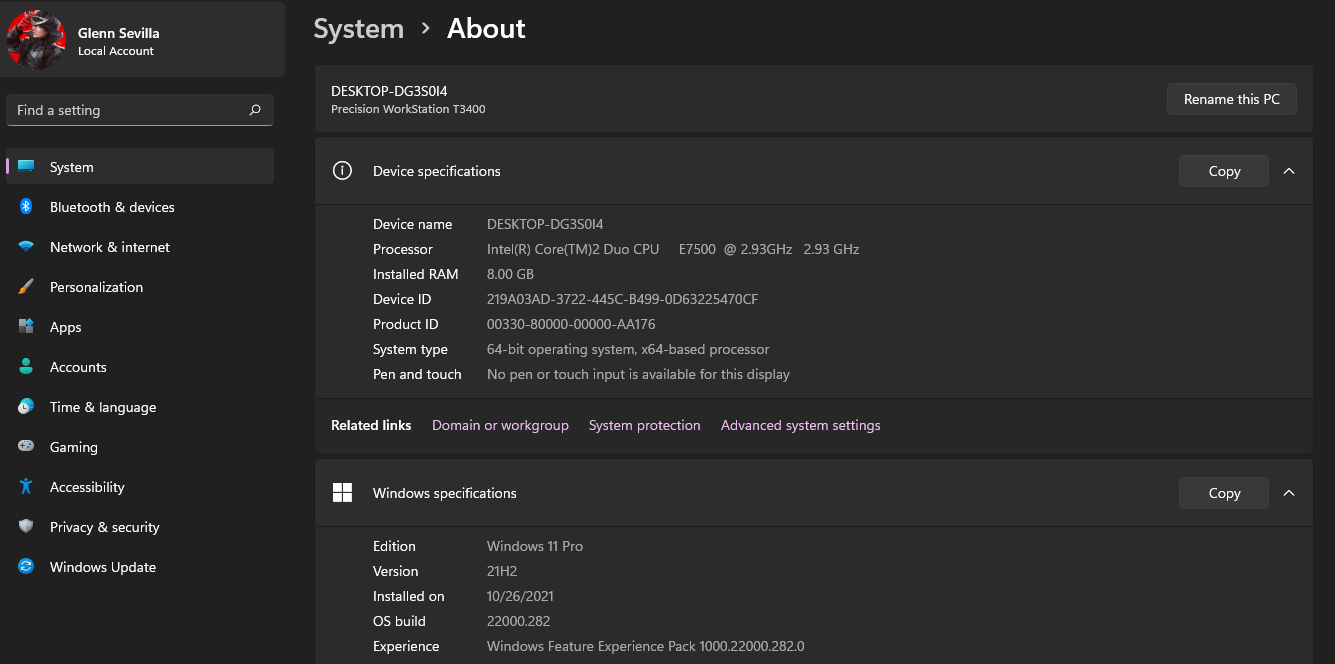
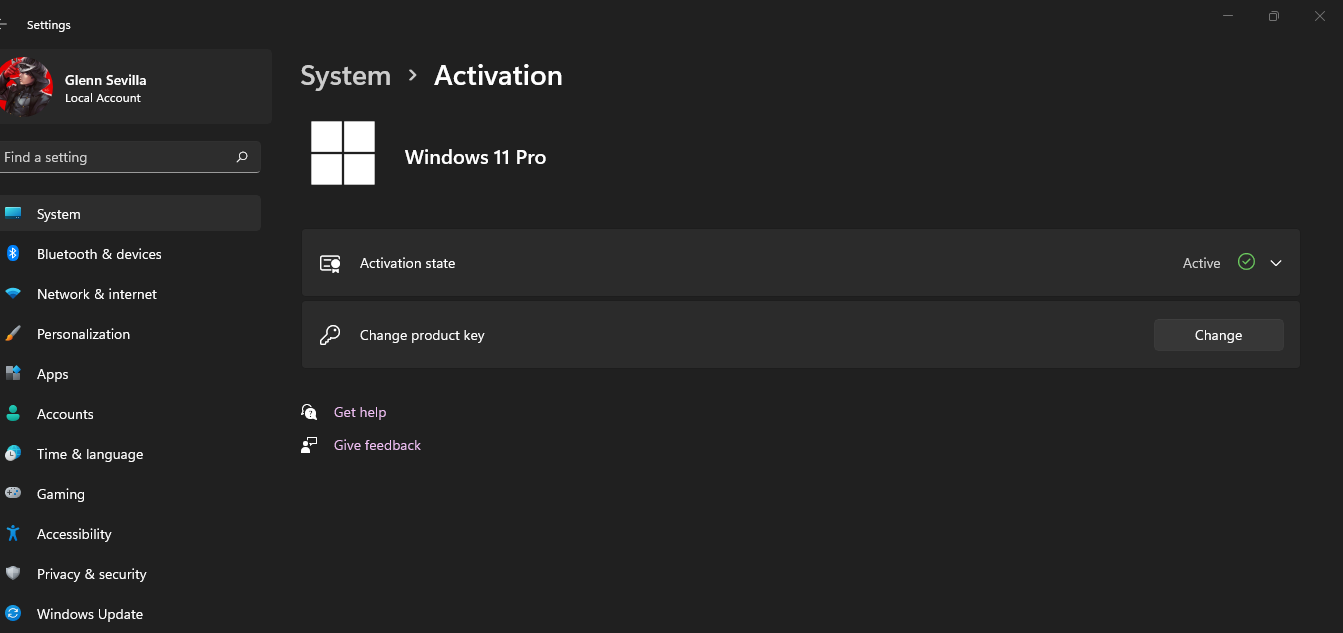
It works, guys just follow Hightech guide if you already in win10pro https://uploads.disquscdn.com/images/ffe0ceefe3f5042534dcb143f1bfffb53f187d13f7f50145719765ba238df066.png https://uploads.disquscdn.com/images/3da8d5225f4826448ce253825ed9cfc793794a63303b204457b6dfe724bd9ca5.png
-
-
#83 written by Muthu kumar 5 years ago
-
can you please tell the spec of laptop bro
In general win 11 requirement isProcessor: 1 gigahertz (GHz) or faster with two or more cores on a compatible 64-bit processor or system on a chip (SoC).
RAM: 4 gigabytes (GB) or greater.
Storage: 64 GB* or greater available storage is required to install Windows 11.
Additional storage space might be required to download updates and enable specific features.
Graphics card: Compatible with DirectX 12 or later, with a WDDM 2.0 driver.
System firmware: UEFI, Secure Boot capable.
TPM: Trusted Platform Module (TPM) version 2.0.
Display: High definition (720p) display, 9″ or greater monitor, 8 bits per color channel.
Internet connection: Internet connectivity is necessary to perform updates, and to download and use some features.
Windows 11 Home edition requires an Internet connection and a Microsoft Account to complete device setup on first use.
-
-
-
-
-
-
-
#97 written by Ahmad 5 years ago
-
-
https://www.youtube.com/watch?v=t29PThS2SF8
This video is about how to create a remote connection without using third party software. if you guys want how to install win 11 guide please scroll below i have posted a video separately for that -
-
-
#109 written by Ajeet Kumar 5 years ago
Hey
Shall i get Cumulative update for Windows 11 After Installing this Setup file from Microsoft According to My System Configuration Below
My System Configuration
Device name HPPavilionG5
Processor Intel(R) Core(TM) i3-2350M CPU @ 2.30GHz 2.30 GHz
Installed RAM 4.00 GB
Bios Date 15-03-2012
System type 64-bit operating system, x64-based processor
Edition Windows 11 Pro
Version 21H2
Installed on 10-10-2021
OS build 22000.194
Experience Windows Feature Experience Pack 1000.22000.194.0
BIOS Mode Legacy
Secure Boot State Unspported
Platform Module Mobile-
#110 written by Aman 5 years ago
-
#112 written by Hightech 5 years ago
Yes! you will get updates!!!! Aman expert trying to make a name for himself. Aman you splurged out ,”NO if you want updates then download and install Windows 11 from official website” regarding Cumulative updates of Windows 11. WRONG. folks you will get all updates with this windows 11 on this site.
-
-
#115 written by ahmad khrousheh 5 years ago
-
#116 written by bayit 5 years ago
Make the USB with rufus install Windows 11 without booting from USB Key. the Check Up from Microsoft will always return a message that your PC doesn’t meet the windows 11 system requirements. even a pc from 2010 will run windows 11. So why trust the program that Microsoft asks you to run to see if your pc meets system requirements? Thanks.
-
-
#117 written by BAZIYOON 5 years ago
-
-
#120 written by Tommy Tutalidge 5 years ago
I have computers that have ryzen cpu’s and just like I figured TPM 2.0 will slow the cpu right down. The Asrock motherboards don’t have the chip on them so you have to enable TPM 2.0 in the bios for the ryzen cpu making it do extra work. Microsoft has gone right off the deep end with all this security crap. I’m going to see how fast they run with the TPM hack and without using the TPM hack even after the fix for ryzen cpu’s this month.
-
#121 written by rmeena 5 years ago
-
-
-
#130 written by Allan Jackson 5 years ago
To anyone who has doubt about this OS or any other OS, 99% of the time the minimum Spec is only there to try and force you to fork out more money on new gearcomputers, I have personally installed Windows 11 on a SINGLE CORE laptop with 6gb Ram, that I use to prove the minimum specs for new versions of Windows is all BS and guess what it still bloody runs for basic computer stuff, a bit slow mind you for multitasking but still runs. As a result I am now in the process of updating ALL my systems to Windows 11, that is something I have never done since the release of Windows 7. normally I would wait until at least the first service pack.
Do what Meena suggests and delete the appraisers.dll file and your good to go, or wait until a lite version is released by one of the major groups.
-
#131 written by Tommy Tutalidge 5 years ago
-
#132 written by Finnt Mc 5 years ago
It is added security.
If I put my PC in sleep mode, and I leave my PC for a few hours, and others are in my house (roommates or whatever) and start my PC, and they don’t need to login, what then? They can remove everything from your PC, put malware on it. And if they are done, they can put it back in sleep mode. Like nothing happened.If that what you want? No login security, so that everyone that knows you put your PC in sleep mode can just us it?
(P.S if room mates do this, you need to find better ones :P)
-
-
#135 written by bayit 5 years ago
Make a bootable USB key with rufus. you can update your operating system by opening setup for windows 11 from windows 10 explorer no need to boot from USB key. it will update windows 10 OS to 11 flawlessly. to everyone who is worried about this release it is awesome, no need for TPM check when updating, plus you can keep all settings and files. only remove the old installation of windows 10 after you have checked to see if everything is working. P.S : Do not listen to all the “NAY” Sayers who complain about this release. Thanks for this site Get Into PC staff.
-
#136 written by Baziyon Tutorials 5 years ago
Fix TPM 2.0 problem
https://youtu.be/uyozTKJeRNo -
-
https://www.youtube.com/watch?v=cMHGbWrW4Rs
here is the guide
-
-
#139 written by jay 5 years ago
-
#141 written by Mik 5 years ago
Can This Install In My PC
My Laptop SpecsCurrent Window: Windows 10 Pro 64-bit (10.0, Build 19044) (19041.vb_release.191206-1406)
System Manufacturer: Dell Inc.
System Model: Latitude E6320
BIOS: Default System BIOS (type: BIOS)
Processor: Intel(R) Core(TM) i5-2520M CPU @ 2.50GHz (4 CPUs), ~2.5GHz
Memory: 8Gb RAM
DirectX Version: DirectX 12
Card name: Intel(R) HD Graphics 3000
Chip type: Intel(R) HD Graphics Family
Dedicated Memory: 32 MB
Current Mode: 1366 x 768 (32 bit) (40Hz)
Monitor Name: Generic PnP Monitor -
#144 written by Mudassir Mujtaba Magsi 5 years ago
-
#145 written by Finnt Mc 5 years ago
See if you can match this
https://www.microsoft.com/en-hk/windows/windows-11-specifications#table1
There is also a PC health checker app made by Miscrosoft that does the checks for you and tells you
-
-
#149 written by Abd R 5 years ago
-
#150 written by lucky lakshitha 5 years ago
https://drive.google.com/file/d/1QUl9MYDU-sM3IzOqVkMJLpavcTpA4aw1/view
Download Thise Dll And Install It (Its TMP Blocker) -
#151 written by Finnt Mc 5 years ago
Windows 11 is quite brand new
It should be able to play games, but it does it at a worse performance.
If you don’t have TPM 2.0, you can’t install it. There are things on the internet that can block that / remove that limitation. But I am not quite sure if those can be trusted.
And I just looked up your CPU, it is quite old (2012) so it likely does have TPM
-
-
#152 written by Shan Ali 5 years ago
-
#153 written by Sami Ullah 5 years ago
-
-
#155 written by Abdullah Qureshi 5 years ago
-
#157 written by BAZIYOON 5 years ago
Free VPN for windows 11
https://bit.ly/3BICUV7 -
-
#160 written by Jethro Albay 5 years ago
it’s literally free on Microsoft Website, it’s already pre-activated idk why Microsoft did it, maybe 1 year after release license is not free anymore, but ofc the installer is free.
https://www.microsoft.com/en-us/software-download/windows11 -
#161 written by Baziyon Tutorials 5 years ago
Solves all TPM 2.0, SUCURE BOOT and PC imcompatibility problems
https://bit.ly/3vjhbkd -
#163 written by Sami Ullah 5 years ago
-
-
#168 written by Tommy Tutalidge 5 years ago
Use a key from windows 10. Windows 10 pro key for windows 11 pro or a windows 10 home key for windows 11 home version. Just put windows 10 on a hard drive or virtual drive then activate it and take the key and use it for windows 11. The same thing worked for windows 7 upgrading to windows 10. You could also activate windows 7 and then use the key for windows 10 then take the key from windows 10 and use it for windows 11.
-
#169 written by Ashish 4 years ago
if you are in the setup you can skip the activation now and download kms auto or something to activate it or you can download this file and select how you want to activate.
link:https://www.mediafire.com/file/bf4yey7gi73sshb/MAS_1.4_AIO+{CracksHash}.cmd/file
-
#170 written by Randy Rogers 4 years ago
-
-
-
-
#172 written by Baziyon Tutorials 5 years ago
Solves all TPM 2.0, SUCURE BOOT and PC incompatibility
https://youtu.be/uyozTKJeRNo -
#175 written by Christian Agbotah 5 years ago
I have been using this site for close to 5 years now. And all the software I have downloaded from here have been great. I just downloaded the windows 11 and did my upgrade today smoothly without any issue. Just off your internet connection during the installation and reconnect after everything is done. I received a cumulative update for windows 11 right from Microsoft right after my upgrade and installed it successfully. So all the negative comments here about this iso file for windows 11 are never true. Admin, thank you so much for the great work done.
-
-
#178 written by Hightech 5 years ago
-
-
-
#183 written by Christian Agbotah 5 years ago
I have been using this site for close to 5 years now. And all the software I have downloaded from here have been great. I just downloaded the windows 11 and did my upgrade today smoothly without any issue. Just off your internet connection during the installation and reconnect after everything is done. I received a cumulative update for windows 11 right from Microsoft right after my upgrade and installed it successfully. So all the negative comments here about this iso file for windows 11 are never true. Admin, thank you so much for the great work done.
-
#186 written by Allan Gwanzura 5 years ago
-
#188 written by Saleh Bhatti Bhatti 5 years ago
Thanks to the team i have tried to make multiple windows bootable drive and i even added windows 11 iso and it worked for me
4 windows in 1 usb wow
https://www.youtube.com/watch?v=JSyWyXmJGSs -
-
#192 written by Ahmed Mostafa 5 years ago
-
#196 written by Seishurou 4 years ago
-
#198 written by Peter Kwadwo Sam 4 years ago
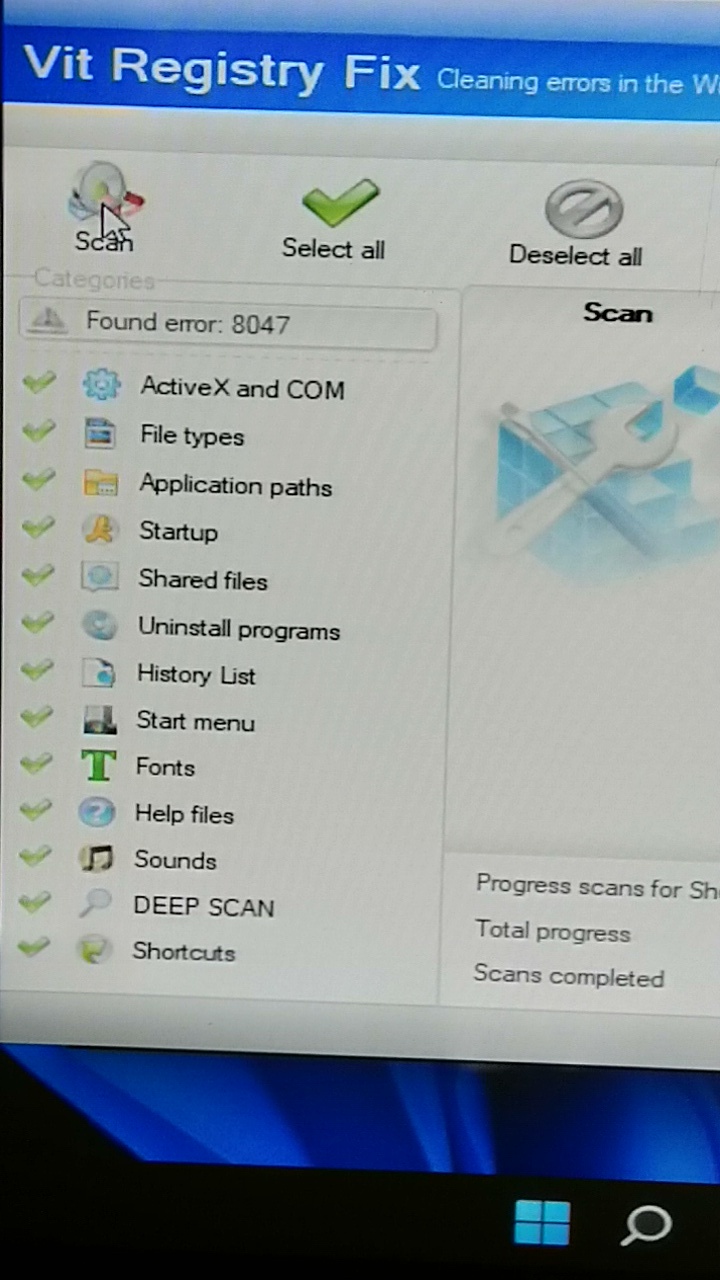
https://uploads.disquscdn.com/images/ab1fc15f502a7424a80b942b999d724c9387f081ccd2ca4e5f21f0ace7fb71e0.jpg
After installation, over 8000 errors were found
Will it work after fixing them? -
#199 written by Xtrim Media 4 years ago
-
#202 written by Randy Rogers 4 years ago
-
https://www.youtube.com/watch?v=U62YVz60cSI
check this video to know your pc is compatible
-
-
#210 written by Rizal Rizki 4 years ago
-
#211 written by Wolf Angels 4 years ago
-
-
#212 written by Adith Muruganandan 4 years ago
-
#216 written by anna 4 years ago
-
-
#222 written by Fares 4 years ago
-
#223 written by RakerPH 4 years ago
-
-
#224 written by Ashutosh 4 years ago
-
#226 written by Saeed Alam 4 years ago
-
#227 written by slayer_di 4 years ago
-
https://www.youtube.com/watch?v=cMHGbWrW4Rs
checkout this video guys -
#230 written by mpepo 3d 4 years ago
-
-
#232 written by Sagar pd Shrestha 4 years ago
-
-
-
#237 written by IT Networking 4 years ago
-
#240 written by Otireme Sama 4 years ago
-
#245 written by GOLDBERG DK 4 years ago
Hi everybody, everything is perfect on my computer. more faster than Windows 10. windows boot up within 15 second 1 SSD 128gb for windows, 2 tb HDD for games. I’m a heavy DOTA 2 player. So far the internet and games are very smooth. Perfect with Microsoft store. Please use the driver pack to install the driver. Windows 10 drivers match with Windows 11. Please don’t use auto update. download manual critical update and install by manually. Here the link shows how to download security patches manually.
-
#247 written by Ismail Khan 4 years ago
-
#249 written by M.abrar Roonjha 4 years ago
-
-
-
#256 written by Punit 3 years ago
-
-
-
#264 written by Muhammad Zaim 1 month ago
-
- Comment Feed for this Post


Very Good