Download Free Your Desired App
Home » Softwares » Audio Processing » ReFX Nexus v.2.2 Free Download
ReFX Nexus v.2.2 Free Download
ReFX Nexus v.2.2 Free Download Latest Version for Windows. It is full offline installer standalone setup of ReFX Nexus v.2.2.
ReFX Nexus v.2.2 Overview
ReFX Nexus v.2.2 is a very handy, flexible and high quality instrument with complete sound library plus it is a very powerful fixed management system and streamlined interface which will make it very simple and easy to customize the sounds instantly. You can also download AudioThing Plugins Bundle VST. 
It is an easy to use application which is very useful when you dont want to spend your time on programming. It has got many improvements like polyphonic arpeggiator mode with the strum option, a new distortion effect, internal limiter and lock modes. You can also mute the layers as well as set the volume, panning and detune parameters. ReFX Nexus v.2.2 also lets you apply two global effects rather then one. It has also been equipped with the stereo enhancer which is very handy and it works on the frequency range that is provided. On a conclusive note we can say that ReFX Nexus v.2.2 is an imposing application with complete sound library and which will easily customize the sounds instantly. You can also download Loopmasters Bass Master VST Plugin.

Features of ReFX Nexus v.2.2
Below are some noticeable features which you’ll experience after ReFX Nexus v.2.2 free download.
- A very handy, flexible and high quality instrument with complete sound library.
- A very powerful fixed management system and streamlined interface which will make it very simple and easy to customize the sounds instantly.
- An easy to use application which is very useful when you dont want to spend your time on programming.
- Got many improvements like polyphonic arpeggiator mode with the strum option, a new distortion effect, internal limiter and lock modes.
- Can also mute the layers as well as set the volume, panning and detune parameters.
- Lets you apply two global effects rather then one.
- Equipped with the stereo enhancer which is very handy and it works on the frequency range that is provided.

ReFX Nexus v.2.2 Technical Setup Details
- Software Full Name: ReFX Nexus v.2.2
- Setup File Name: ReFX_Nexus_v.2.2.iso
- Full Setup Size: 3.3 GB
- Setup Type: Offline Installer / Full Standalone Setup
- Compatibility Architecture: 32 Bit (x86) / 64 Bit (x64)
- Latest Version Release Added On: 10th Jan 2019
- Developers: ReFX Nexus

System Requirements For ReFX Nexus v.2.2
Before you start ReFX Nexus v.2.2 free download, make sure your PC meets minimum system requirements.
- Operating System: Windows 7/8/8.1/10
- Memory (RAM): 4 GB of RAM required.
- Hard Disk Space: 4 GB of free space required.
- Processor: Intel Dual Core processor or later.
ReFX Nexus v.2.2 Free Download
Click on below button to start ReFX Nexus v.2.2 Free Download. This is complete offline installer and standalone setup for ReFX Nexus v.2.2. This would be compatible with both 32 bit and 64 bit windows.
Before Installing Software You Must Watch This Installation Guide Video

Related posts:
This Post was Last Updated On: September 23, 2023
-
-
-
-
#10 written by Md Arif Hoshen 6 years ago
-
-
#14 written by Daniel barendregt 6 years ago
-
-
#16 written by HydroTeck Official TV 6 years ago
-
-
-
#18 written by Asafo Gideon 6 years ago
-
-
-
-
#28 written by Knave Miller 6 years ago
-
-
-
-
#31 written by Hardy Handiradi 6 years ago
-
-
-
-
-
-
#53 written by Chetan Sulokh 6 years ago
found out a way for ableton users for whom this plugin didnt show up, first go download jbridge on this website install and run it. make sure you have installed nexus, select the directory for choosing and saving( do all the recommended clicks). Didnt show up for me, said write permissions were not given, so go to the jbridge saved folder click alt+enter, it opens properties, then security, click edit with administrator logo, see there are some options not turned on also the write permision, do all the neccesary and scan again in ableton, it should work, worked for me
this works in all windows 10 64 bit, tested https://media2.giphy.com/media/fuQmie5ScTkTJukgh5/giphy.gif -
-
-
#56 written by Mitchelle R. Lisowski 6 years ago
-
-
-
-
-
-
-
#68 written by Omeawo Mo Shinderyu Nani 6 years ago
-
-
#70 written by Grace Bronze 6 years ago
-
-
#73 written by Sameer 6 years ago
https://mega.nz/#!DUUT3KDB!SL2iwTvFzH3fHemodY8W9N886fEAjNNdY62yHqfVj68 Admin, this is refx nexus 3 but it is not having password. I hope it will work of you tried it.
-
#74 written by Justin Horan 6 years ago
https://mega.nz/#!DUUT3KDB!SL2iwTvFzH3fHemodY8W9N886fEAjNNdY62yHqfVj68
Admin, this is REFX NEXUS3.https://dwnlds.co/49008ec
And this the password of the file and keygen the problem with this file is that it requires human verification but it’s not unlocking even after the test. Will you please post it ? -
-
-
#82 written by your friend 5 years ago
-
-
-
-
#84 written by Legend op 5 years ago
-
-
#88 written by alok kamila 5 years ago
-
-
-
-
#95 written by Setyo Moelyadi 5 years ago
This is my way to run Nexus 2 in DAW Cubase 64 bit and it’s successful
1.) Before install make folder at Local DiskC/ProgramFiles/… for example give name Nexus 2, so that folder located at Local Disk C/ ProgramFiles/Nexus 2
2.) Mount file and run Nexus 2 Setup
3.) At "Select Destination for VSTPlugin", click Browse and point at Local Disk C/ProgramFiles/Nexus 2 ( folder you created )
4.) Install finish
5.) Go to Mounted file, copy folder named "Nexus Content"and paste to
Local Disk C/ProgramFiles/Nexus 2/VSTPlugins
6.) Enjoy Nexus 2 in 64 bit DAW
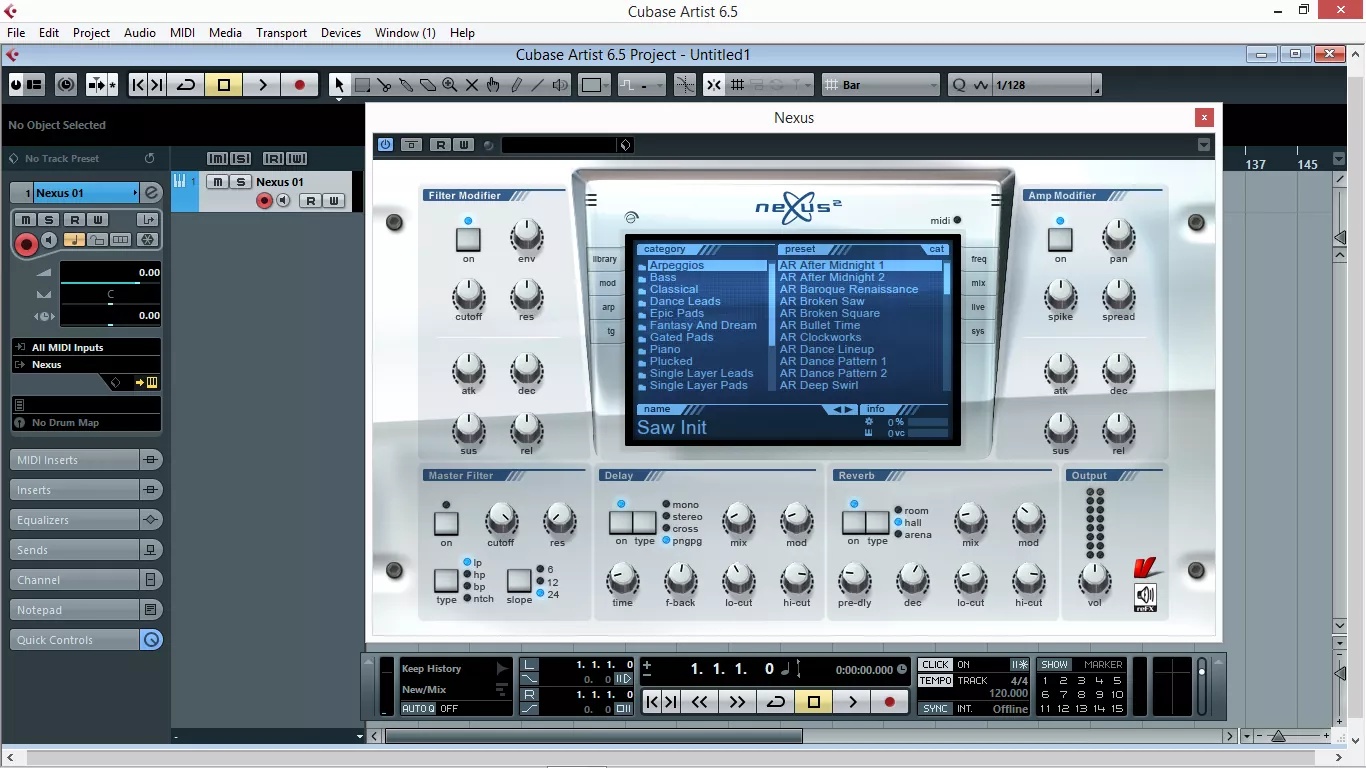
i use Cubase 6.5 【64 bit version】download from here too, thanks admin https://uploads.disquscdn.com/images/4e48f9a40044ac98bea38d995f409fbd9c1c9a090148d3fb25d55206f8db2d26.jpg
-
-
-
-
-
#108 written by Chuks Samuel 5 years ago
-
- Comment Feed for this Post



thanks for this the one that i had got corrupted…